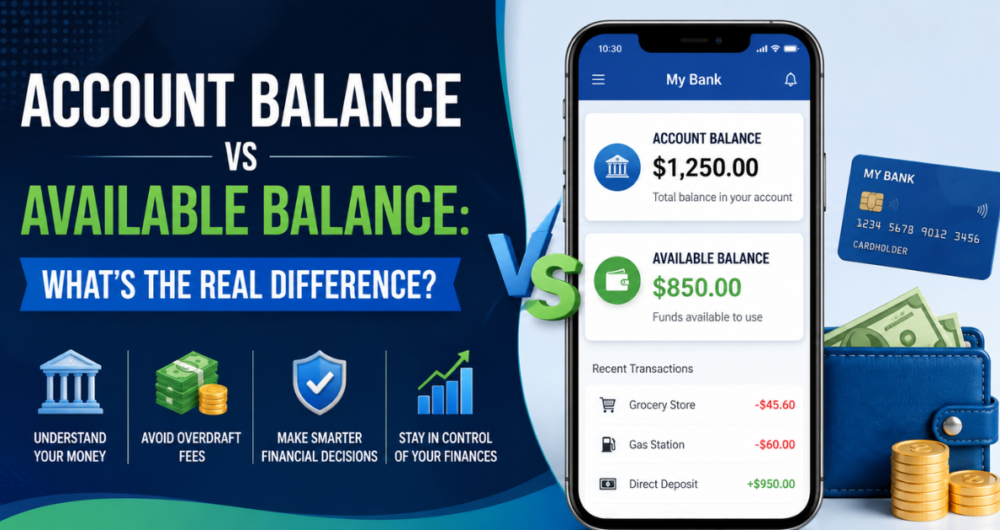
You check your banking app before paying rent, and two numbers stare back at you: one labeled “account balance” and another labeled “available balance.” They rarely match, and that mismatch has cost plenty of people an overdraft fee they never saw coming.
The short version: your account balance (also called your current or ledger balance) is a snapshot of everything that has posted to your account. Your available balance is what you can actually spend right now, after pending transactions and holds are factored in. Understanding the gap between them is one of the simplest ways to protect yourself from fees, declined cards, and bounced checks.
This guide breaks down exactly how each balance is calculated, why banks show you both, and how to use available balance to keep your account in the green.
What Is an Account Balance?
Your account balance — sometimes called your current balance, ledger balance, or total balance — reflects every transaction that has fully posted to your account as of the last time your bank updated its records. It’s essentially a running total: every deposit adds to it, every cleared withdrawal or payment subtracts from it.
The key word is posted. A transaction posts once your bank has fully processed it and permanently recorded it in your account history. Until that happens, the transaction doesn’t touch your account balance at all — even if you already swiped your card or a check you wrote is sitting in someone else’s wallet.
That’s why your account balance can look deceptively healthy. If you write a $200 check on Monday and the recipient doesn’t deposit it until Friday, your account balance will show the full amount sitting in your account for those four days, even though $200 of it is technically already spoken for.
Banks typically update the account balance once per business day, often overnight through batch processing. So the number you see first thing in the morning usually reflects yesterday’s finalized activity, not anything that happened in real time today.
What Is an Available Balance?
Your available balance is the amount of money you can actually spend, withdraw, or transfer at this exact moment without triggering an overdraft. It starts with your account balance and then adjusts for anything still moving through the pipeline: pending debit card purchases, pre-authorized holds, outstanding checks the bank already knows about, and deposits that haven’t fully cleared.
This is the number banks rely on to decide whether to approve or decline a transaction. If you swipe your card for $40, your bank checks your available balance — not your account balance — before saying yes.
A common source of confusion is check and mobile deposits. Many banks add a deposited check to your available balance right away (or within a day) as a courtesy, even though it hasn’t fully cleared and won’t show in your account balance yet. If that check later bounces, the bank can reverse the credit, sometimes producing a negative balance and a fee.
Account Balance vs Available Balance: Side-by-Side Comparison
| Factor | Account Balance | Available Balance |
|---|---|---|
| Also known as | Current balance, ledger balance | Spendable balance, actual usable funds |
| What it reflects | Only fully posted transactions | Posted transactions plus pending holds and authorizations |
| Updates | Typically once daily (overnight batch) | Continuously, throughout the day |
| Used by the bank to approve transactions? | No | Yes |
| Includes uncleared deposits? | Rarely | Often, temporarily |
| Includes pending debit holds (gas pumps, hotels, rentals)? | No | Yes |
| Best number to check before spending | No | Yes |
Why the Two Numbers Don’t Match
There are a handful of everyday situations that create a gap between your account balance and your available balance. Recognizing them helps explain why your banking app sometimes seems to be showing you conflicting information.
1. Pending Debit Card Transactions
When you use your debit card, the merchant’s bank sends an authorization request before the final transaction amount is confirmed. Your bank places a hold for that estimated amount, which reduces your available balance immediately — but the transaction won’t post, and won’t touch your account balance, until the merchant submits the final charge, sometimes days later.
2. Merchant Holds That Exceed the Final Charge
Certain merchants — gas stations, hotels, car rental agencies — place a hold larger than the actual purchase amount to cover incidentals or fuel estimates. A $1 pump swipe can trigger a $75–$100 hold that ties up your available balance for a day or two, even though your account balance won’t reflect anywhere near that amount once the real charge posts.
3. Checks You’ve Written but the Recipient Hasn’t Deposited
A check you write reduces your available balance the moment your bank becomes aware you’ve issued it (in systems that track outstanding checks), but it won’t reduce your account balance until the recipient deposits it and it clears.
4. Mobile or ATM Check Deposits
Banks often make part or all of a deposited check available quickly as a convenience, boosting your available balance before the check has fully cleared and before it appears in your account balance.
5. Scheduled or Recurring Payments
Some banks flag upcoming autopay transactions against your available balance slightly before the payment actually posts, to prevent you from double-spending funds that are already committed.
Why This Matters: Overdrafts, Declines, and Fees
Here’s the part that actually affects your wallet: banks authorize or decline transactions based on your available balance, not your account balance. If you only ever glance at your account balance, you can walk into two costly situations:
- Overdraft fees. You see a healthy account balance, spend accordingly, and then a pending hold or an outstanding check clears — pushing your real available balance negative and triggering an overdraft fee, sometimes $30–$35 per incident.
- Declined transactions. The opposite can also happen: your account balance looks fine, but a merchant hold has temporarily eaten into your available balance, so a purchase gets declined even though you technically “have the money.”
Financial institutions consistently point to this exact confusion as one of the leading causes of unexpected overdraft charges. The fix is simple: always check your available balance before making a purchase, not your account balance.
How to Check Both Balances
Most banks and credit unions display both numbers side by side in their mobile app or online banking portal. You can typically find them:
- On your account dashboard immediately after logging in
- On an ATM receipt or screen (often labeled “balance” and “available balance”)
- By calling automated phone banking
- By asking a teller in person
If your bank’s app only shows one number, don’t assume it’s your available balance — check the account details or a recent transactions screen to see if any holds or pending items are listed separately.
Tips to Avoid Overdrafts Because of the Balance Gap
- Treat your available balance as your real number. Don’t budget or spend based on account balance alone.
- Build a buffer. Keeping even $100–$200 as a cushion absorbs the impact of holds and pending transactions you can’t predict.
- Check pending transactions regularly, not just the top-line balance number.
- Be cautious with gas pumps, hotels, and rental cars. These merchants place the largest holds relative to the actual purchase.
- Set up low-balance alerts. Most banks let you get a text or push notification when your available balance drops below a threshold you choose.
- Wait for large checks to fully clear before spending against a deposit, especially from unfamiliar senders.
- Consider opting out of overdraft coverage for debit card transactions if you’d rather have a purchase declined than pay a fee — this is a setting most U.S. banks are required to let you control.
Account Balance vs Available Balance in Credit Accounts
The same two concepts show up on credit cards and lines of credit, just with the logic flipped. Here, the account balance (sometimes called the outstanding or current balance) reflects the total amount you owe. Your available balance, or available credit, is the difference between your credit limit and your current balance — the amount you still have room to spend.
Pending purchases reduce your available credit right away, the same way a pending debit shows up on a checking account, even before the charge officially posts to your statement balance. So the underlying idea — posted activity versus real-time spendable/available capacity — applies whether you’re looking at a checking account or a credit line.
A Real-World Example
Let’s walk through a simple scenario to see the two balances in action.
Say your account balance on Monday morning is $500. That’s the confirmed total after all fully posted transactions.
- On Monday afternoon, you fill up your car and swipe your debit card at the pump. The gas station places a $100 hold, even though your actual fuel purchase is only $35. Your account balance is still $500, but your available balance drops to $400.
- On Tuesday, the final $35 charge posts. The $100 hold releases. Your account balance updates to $465, and your available balance climbs back to $465 as well — the two numbers sync up again.
- On Wednesday, you write a $150 check to a contractor. Your account balance stays at $465 until the contractor deposits it. But once your bank is notified of the outstanding check (some banks track this, others don’t until the check clears), your available balance may reflect the reduction sooner.
- On Thursday, the contractor deposits the check. It clears, and both balances now read $315.
Notice how the available balance moved first in almost every case — it’s the leading indicator of what’s really happening with your money, while the account balance eventually catches up once everything finishes processing.
Common Misconceptions About Account Balance and Available Balance
“If my account balance is positive, I can’t overdraw.” Not true. Overdrafts happen against your available balance. A positive account balance says nothing about pending holds that might already be eating into what you can spend.
“Available balance is just my account balance minus pending debits.” Close, but not complete. It also factors in things like outstanding checks the bank is aware of, linked overdraft protection, and provisional credits for recent deposits — so the math isn’t always a simple subtraction.
“Banks update balances instantly, all day long.” Available balance updates fairly quickly as holds are placed and released, but your account (ledger) balance typically only finalizes once per business day during overnight processing. That’s part of why the numbers can look out of sync during the day.
“A pending transaction that disappears means the charge was cancelled.” Not necessarily. Sometimes a hold drops off and is replaced by the final transaction a day or two later under a slightly different amount or description. Don’t assume the money is free to spend again until you confirm the final charge never posted.
“Available balance and available credit are the same thing.” They’re related concepts but apply to different account types. Available balance is used for deposit accounts like checking and savings. Available credit is the equivalent concept for credit cards and lines of credit — your limit minus your current balance and pending charges.
How Banks Calculate Available Balance Behind the Scenes
While the exact formula varies by institution, most banks follow a version of this logic:
Available Balance = Ledger (Account) Balance + Provisional Credits − Holds − Pending Debits − Uncollected Outstanding Checks (if tracked)
Provisional credits might include a portion of a mobile check deposit made available early. Holds include merchant authorizations like the gas station example above. Pending debits cover any card transaction that has been authorized but not yet posted. This formula is why two customers with the same account balance can have very different available balances depending on their recent spending activity.
Frequently Asked Questions
Is available balance always lower than account balance?
Usually, yes, because pending debits and holds reduce it. But it can occasionally be higher — for example, right after a mobile check deposit is provisionally credited before it appears in your posted account balance.
Which balance should I trust when budgeting?
Your available balance. It’s the number your bank actually uses to approve or decline transactions, so it’s the most accurate picture of what you can safely spend.
Can my available balance be wrong?
It can lag reality slightly — a hold might not release the instant a transaction finalizes, or a merchant might take a few days to submit the final charge. Refreshing your app or waiting a day usually resolves discrepancies.
Does available balance include overdraft protection or a credit line?
At many banks, yes — if you’ve opted into overdraft protection or linked a line of credit, that available cushion may be blended into the available balance shown. Check with your bank, since policies vary.
Why does my available balance show more than my account balance?
This typically happens after a recent deposit that your bank has provisionally credited to your available balance before it’s fully posted and reflected in your account balance.
The Bottom Line
Account balance and available balance aren’t two versions of the same fact — they’re two different questions. Account balance answers “what has officially happened in my account so far?” Available balance answers “what can I actually spend right now?” When you’re deciding whether you can afford a purchase, the second question is the one that matters. Make a habit of checking your available balance, keep a small buffer for pending holds, and you’ll sidestep most of the overdraft surprises that catch other account holders off guard.